Writing for DAPs: How GRAVITY Authors Create Guidance Users Actually Follow
Learn how GRAVITY Authors write effective micro-copy, tailor guidance by role, and build Callouts that improve onboarding and digital adoption.

Illustration: Photo by Wilhelm Gunkel on Unsplash, composition by Gravity Global AG.
Every digital adoption platform (DAP) promises faster onboarding, higher digital adoption rates, and better ROI. In reality, however, the difference between a DAP that delivers value and one that gets ignored often comes down to something much more subtle: what the user actually sees on screen in the moment they need help.
For GRAVITY Authors, this means that writing is not just content creation. It sits at the intersection of employee experience, change management, and product design.
A Callout is not a paragraph.
A Walkthrough is not a document.
And micro-copy is not “just text.”
As highlighted in GRAVITY Goals: Smarter Onboarding & Change Management, successful digital adoption depends on supporting users exactly at the point of need. That, in turn, requires guidance that is precise, relevant, and easy to act on without interrupting the flow of work.
When Guidance Becomes Noise
Most ineffective DAP content does not fail because it is wrong. It fails because users do not engage with it.
In a busy digital workplace, people want to complete tasks, not read instructions. When guidance is too long, too generic, or poorly timed, it becomes digital friction and is quickly dismissed.
As described in Create Effective Training Content, too much information without structure or context leads to cognitive overload. In GRAVITY, good Callouts avoid this by acting like signposts: they guide attention, support decisions, and help users move forward with confidence.
Micro-Copy That Moves Users Forward
Writing for a digital adoption platform is different from writing traditional help documentation, software training, or knowledge base articles.
You are not explaining the entire system. You are supporting users’ next action.
A good GRAVITY Callout answers one simple question: “What should I do right now?”
As explained in Anatomy of A Great Callout, Callouts are more than decorative text boxes. They are actionable, user-centric tools that help users understand what matters, what to do next, and why it matters now. This means that effective micro-copy is not only about short wording. It is also about purpose, context, timing, and the right Callout type.
GRAVITY offers different Callout types for different purposes, and as covered in Which Callout type is the right one?, choosing the right type is part of good digital adoption design. A helpful Callout has a clear purpose, uses simple and actionable copy, fits the user’s current context, and appears only when it adds value.
Do: Make the next action obvious
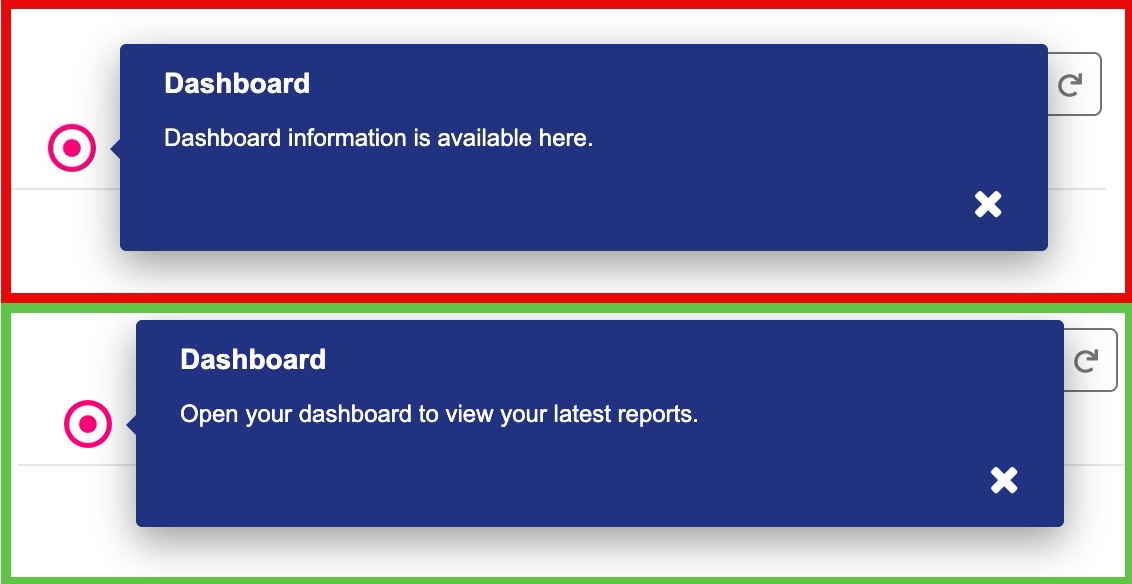
A good Callout version is clearer because it gives the user a direct action. It does not explain too much. It supports just-in-time learning and helps the user continue without leaving the application.
Don’t: Write too much
A common pitfall is trying to fit the entire workflow into one Callout. This increases the employee learning curve and turns helpful guidance into noise.
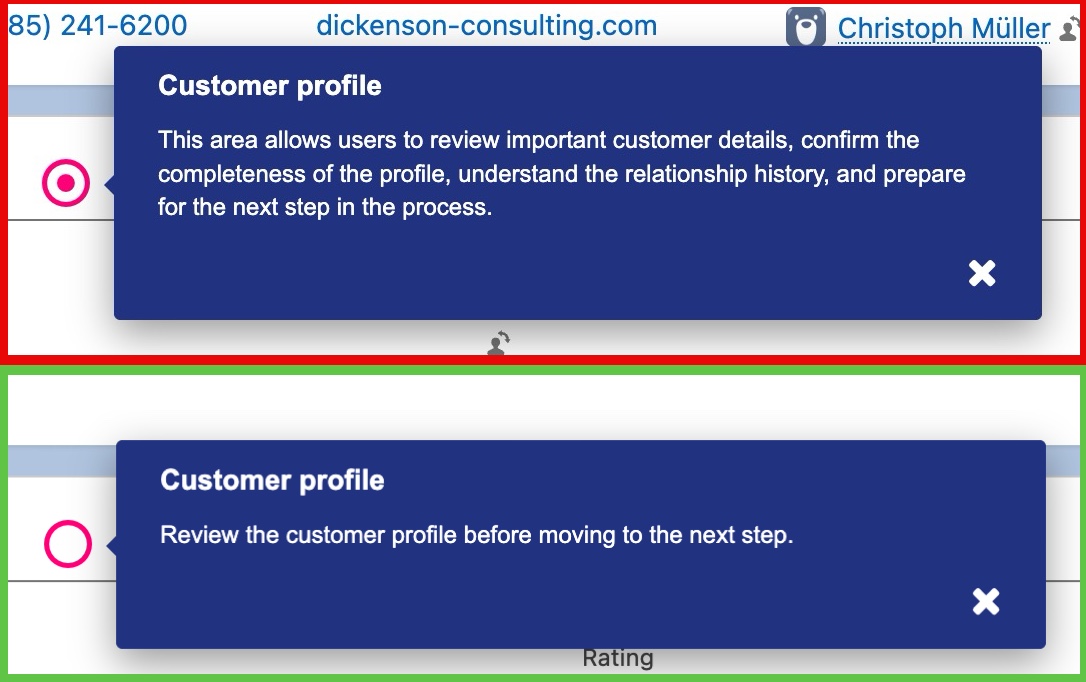
The good version focuses on one immediate action. If the full process requires more explanation, use several Callouts, Smart Tips, or an interactive walkthrough.
Do: Choose the right Callout type for the message
A Single Callout should encourage action. A warning should prevent risk. An Information Callout should clarify, not interrupt. A highlight should draw attention to something important.
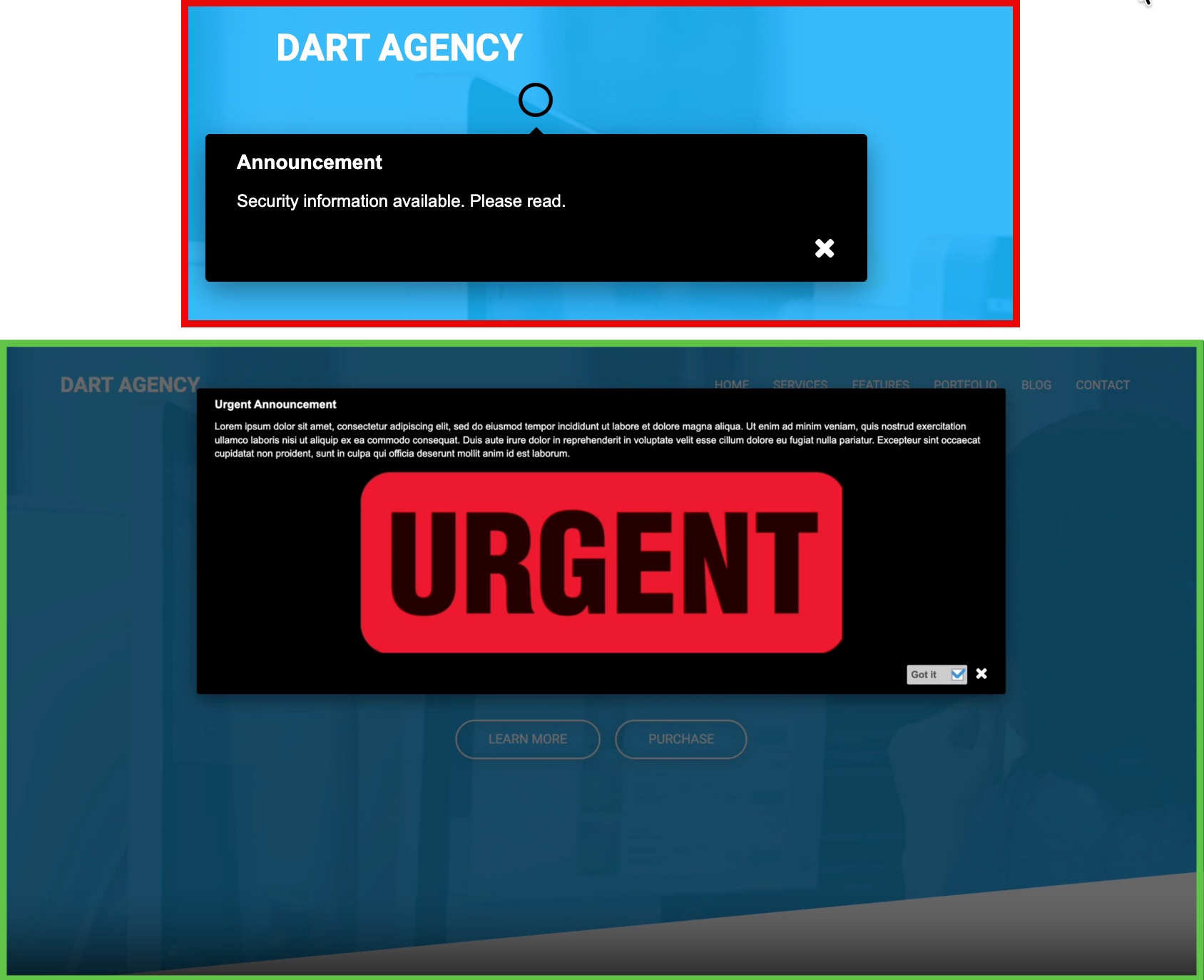
The good version uses the message like a warning, not a vague information note. This helps users understand urgency and act correctly.
Don’t: Be too generic
A message that could appear anywhere is useful nowhere. Generic Callouts rarely support real software adoption because they do not connect to the user’s task, screen, or decision.

The good version gives users a specific point of focus. It reduces uncertainty and supports employee performance directly in the workflow.
Do: Use visual hierarchy with intention
The title, text, icon, image, Hotspot color, and Callout background should support the message. Users should immediately understand whether they are seeing old or new information, a security alert, or a new feature highlight.

The good version aligns content, purpose, and visual priority. This reduces ambiguity and improves employee productivity.
Don’t: Show too many Callouts at once
Too many Callouts compete for attention. When everything is highlighted, nothing feels important. For more complex explanations, consider adding a Read More button leading the user to Wiki or additional documentation; Workflow Callouts; or creating a guided learning path.

Good micro-copy respects the user’s focus. This is the key difference between passive information and active performance support.

Embrace the digital adoption platform of tomorrow - GRAVITY
The Digital Adoption Updates You Can't Miss - Subscribe Now!
Join Our Monthly Author Call – Stay Ahead of the Curve with the Latest Trends!
Conclusion: When Guidance Feels Natural, Adoption Follows
The best DAP content often feels almost invisible. It does not feel like training, documentation, or another system layer. It feels like part of the application itself.
By combining clear micro-copy, role-based Audiences, structured Goals, contextual help, Analytics, and continuous optimization, GRAVITY Authors can reduce digital friction and improve employee productivity.
Effective in-app guidance supports users from discovery to onboarding, from productivity to mastery. It improves employee satisfaction, accelerates software adoption, and helps teams build real software proficiency.
Digital adoption is not about delivering more content.
It is about providing the right guidance, at the right time, in the right context, so users can move forward with confidence.

Ramona Lescesen
After completing my Masters in the UK, I had the opportunity to start my career in London's vibrant start-up scene. In my career, I have had the privilege of seeing how a start-up can grow into a global market leader. This has taught me the importance of good communication and how best to manage a company's most important relationships - its customers.
Latest articles
Browse all posts