Quick Check: Are You Logged in with the Right GRAVITY User Profile?
Learn how to quickly verify the active user in the GRAVITY browser extension.
One of the most common questions we receive from GRAVITY Authors is:
Why can't I see the Callout I just created?
In many cases, the Callout configuration itself is perfectly correct. Goals, Audiences, and triggers are set up exactly as intended — yet the Callout still doesn’t appear.
Very often, the reason is surprisingly simple: the active user in the GRAVITY browser extension is not the user you expect.
This can happen if you previously logged in as another test user, switched profiles during testing, or are using a user account with limited permissions or different Audience memberships.
Since GRAVITY content is often targeted to specific users or Audiences, logging in with the wrong profile means the Callout may not display at all.
The good news: verifying the active user only takes a few seconds.
How to Check Which User You Are Logged In As
If you ever find yourself in a situation where everything appears to be configured correctly but your Callout still isn’t visible, follow these quick steps:
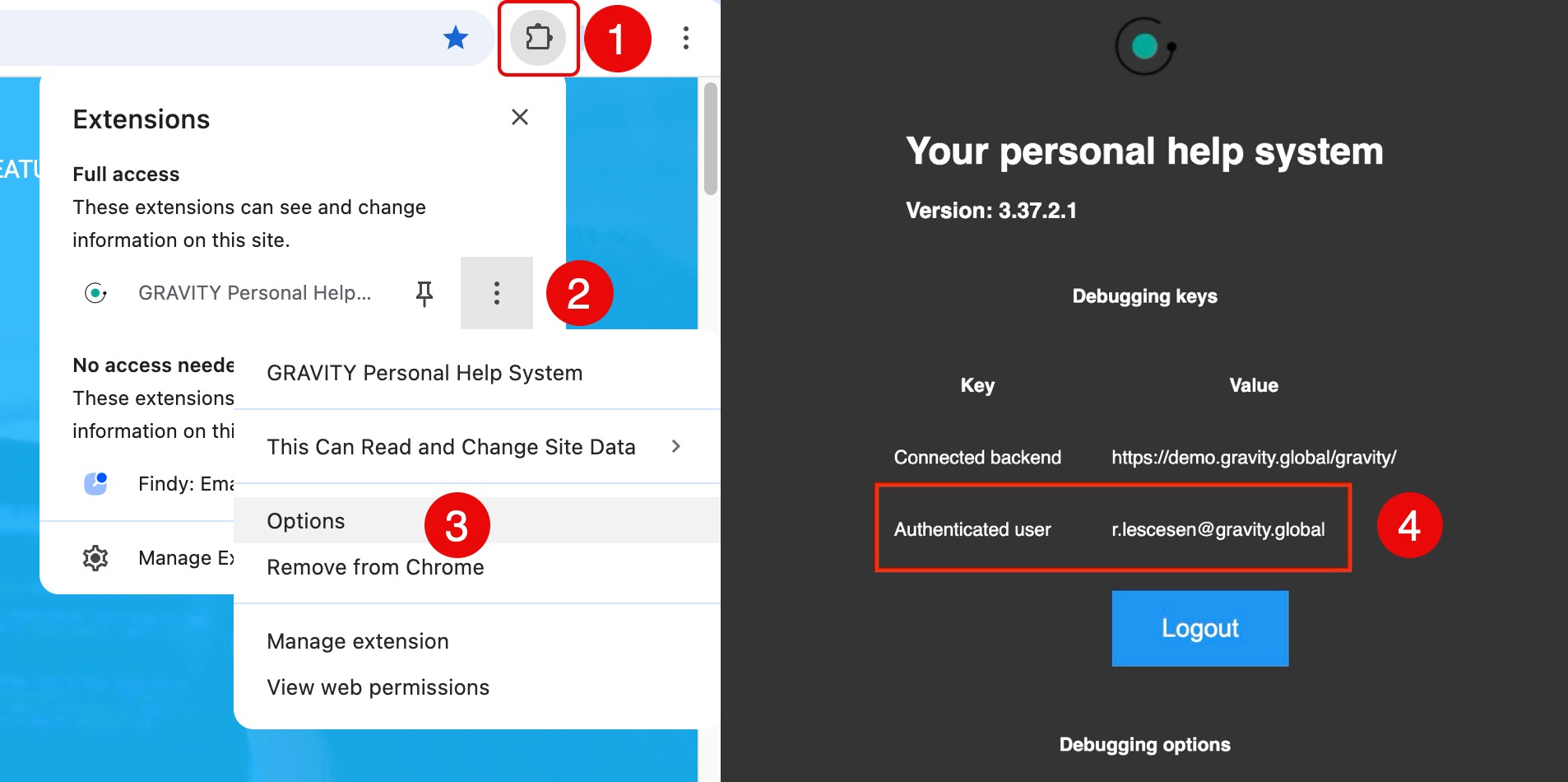
- Open Extensions Overview in your browser (Step 1)
- Locate the GRAVITY (Personal Help) extension
- Click the three vertical dots on the right-hand side (Step 2)
- Select Options (Step 3)
- Check Authenticated user to see which user is identified by GRAVITY (Step 4)
What to Do If the User Is Incorrect
If you notice that you are logged in with a different user:
- Simply log out and sign in again using the correct user account.
- Once you are logged in with the expected profile — including the correct permissions and Audience memberships — refresh the page and test your Callout again.
In many cases, this resolves the issue immediately.

Embrace the digital adoption platform of tomorrow - GRAVITY
The Digital Adoption Updates You Can't Miss - Subscribe Now!
Join Our Monthly Author Call – Stay Ahead of the Curve with the Latest Trends!
Still Not Seeing Your Callout?
If you have confirmed that:
- You are logged in with the correct user
- The user has the necessary permissions
- The user is part of the intended Audience
…and the Callout still does not appear as expected, our team will be happy to help.

Ramona Lescesen
After completing my Masters in the UK, I had the opportunity to start my career in London's vibrant start-up scene. In my career, I have had the privilege of seeing how a start-up can grow into a global market leader. This has taught me the importance of good communication and how best to manage a company's most important relationships - its customers.
Latest articles
Browse all posts